For buyers
Buyer's guide
Everything you can do as a buyer — from searching for furniture and trying it in your room to ordering, tracking, and returns. Step by step, with pictures.
What's in the guide
Everything you can do as a buyer on furnituria.co — from searching for furniture to ordering and returns. Images are from the actual site; click on an image to open it in full size.
- Find furniture
- Fits in my room
- Product page
- Does it fit and will it pass through to the room
- Custom-made and sets
- Try in your room
- Room layout
- Request for quote (custom)
- Ask us assistant
- Wishlist and comparison
- Cart
- Payment
- After ordering
- My trials and "Ask the household"
- My projects — room with a budget
- Cancellation and returns
- On your phone, as an app
- FAQ
How shopping works
You buy directly from showrooms, workshops, and manufacturers. The platform connects them with you, and your purchase contract is with the seller.
- ChooseSearch, filters, and "Fits in my room".
- TrySee the piece in your room before buying.
- OrderCart by seller, payment on delivery or via bank transfer.
- ReceiveThe seller accepts within 48 hours and ships with a tracking number.
- ConfirmWith one click, you report that it has arrived and rate the seller.
1Find furniture
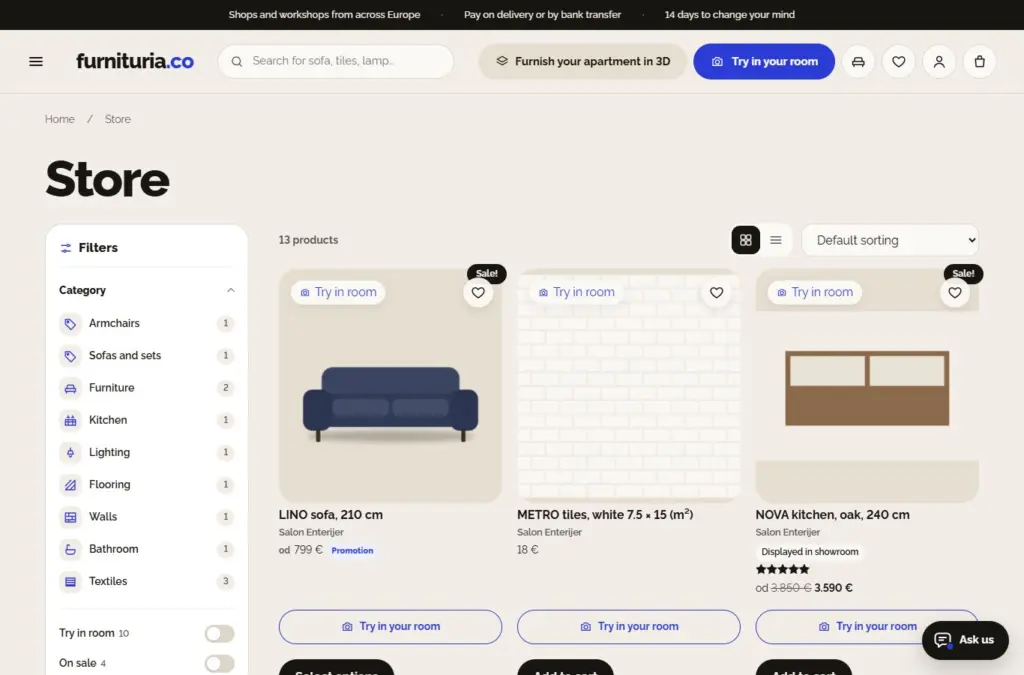
The Shop contains all offers, by category: sofas and sets, armchairs, tables, beds, wardrobes, lighting, rugs, flooring, walls, bathroom, and decor.
- Search at the top of every page shows suggestions as you type and understands words without diacritics and word beginnings ("plocice" finds "Pločice", "sto hra" finds "Sto Hrast").
- Filters on the left: category, "Try in room" (only products you can see in your room), "On sale", "In stock", "Fits in my room", price, color, material, number of seats, width, size, and seller.
- Sorting at the top right: by popularity, rating, price, or newest.
- On the product page: heart adds it to your wishlist, and "Add to cart and try in room" adds the product to your cart and opens the trial (for products with colors and sizes, "Select and try" leads to color/size selection).
2Fits in my room
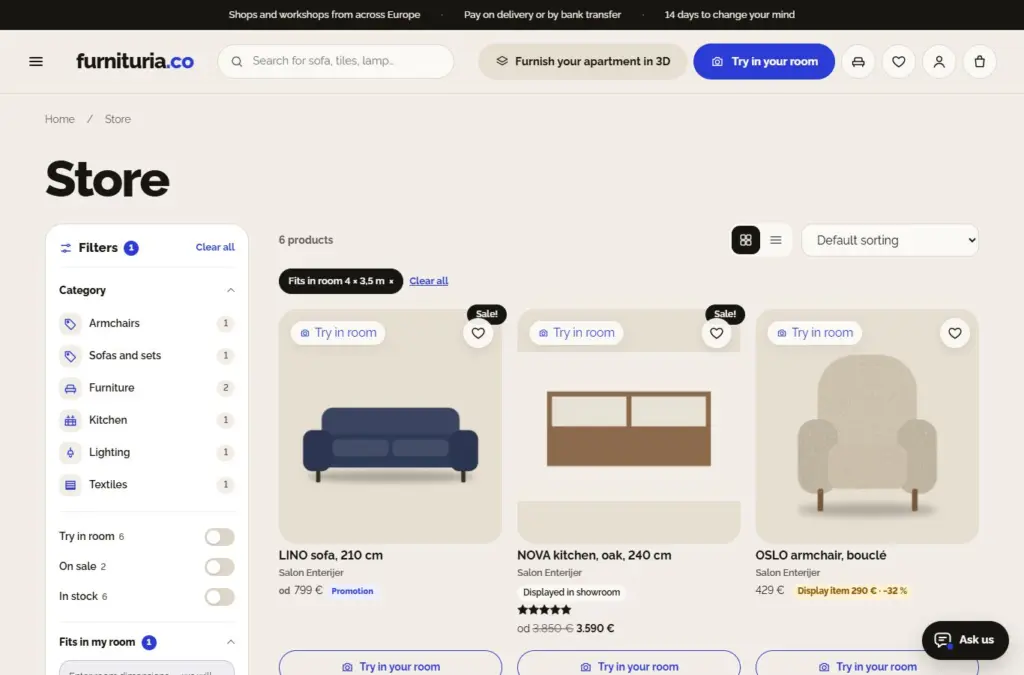
In the filters, enter the length and width of the room (e.g., 4 and 3,5 m). The shop shows only pieces that fit — with enough space for passage, chairs around the table, and opening wardrobes.
- At the top of the list is the room label ("Fits in room 4 × 3,5 m"); click × to remove it.
- We calculate using the actual dimensions of the assembled product provided by the seller.
- The "Arrange room layout →" link immediately opens Room Layout with those dimensions.
Measure the floor from wall to wall and note where the doors, windows, and radiators are. If you don't know exactly, write the measurements to the assistant — they will suggest what fits.
3Product page
Everything about the piece in one place:
- Price and variants — color, fabric, or dimension change the price and image immediately.
- Add to cart and try in your room — the product goes into your cart and a trial in your room opens (more in the Trial section).
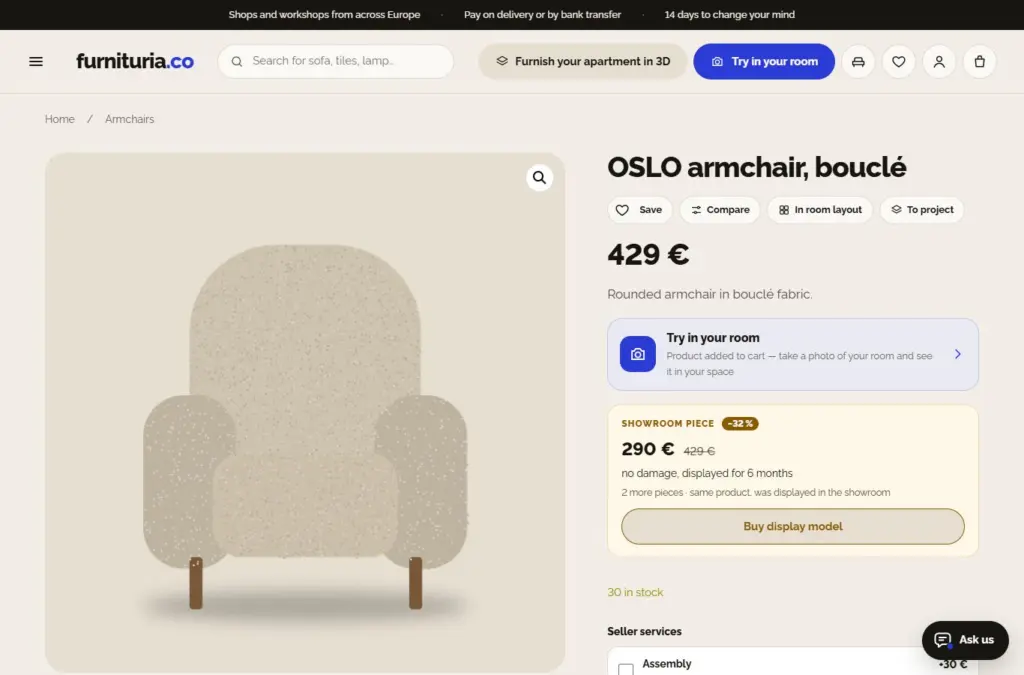
- Save (wishlist), Compare, and In room layout — buttons below the name.
- Dimensions and checks "Does it fit in your home?" and "Does it pass through to the room?".
- Seller services — assembly, bringing into the apartment, or removing old furniture: check before "Add to cart" and you immediately see the price per item; the service is added to the order and performed by the seller during delivery.
- Order a sample (under “Other purchase options”) — for products where the seller provides fabric or material samples (for variants: selected colors). The sample is added to the cart at the sample price or for free, with no shipping costs; the seller sends it by mail. Maximum 5 samples in the cart.
- Q&A — ask the seller anything about the product (name is optional, email is not displayed). The answer arrives by email and is published on the product page, so other buyers can see it; the "Ask us" assistant on the product page also uses these answers.
- Outlet: floor model — for some products, the seller also sells a piece that was displayed in the showroom at a lower price, with a description of its condition (under “Other purchase options” → “Buy floor model”). All floor models are on the Outlet page; if the product is on your wishlist, we will notify you when a floor model becomes available.
- Contact the seller — all in one place: video call and WhatsApp message, “Schedule a visit” to the showroom (to see a product marked “Available in showroom” in person), and a question on the site.
- Sold and shipped by — right below the price: who the seller is, “Verified” badge, delivery time, and shipping cost.
- When a product is unavailable, "Notify me when it arrives" sends you an email as soon as it's back in stock.
4Does it fit and will it pass through to the room
Two checks below the "Add to cart" button:
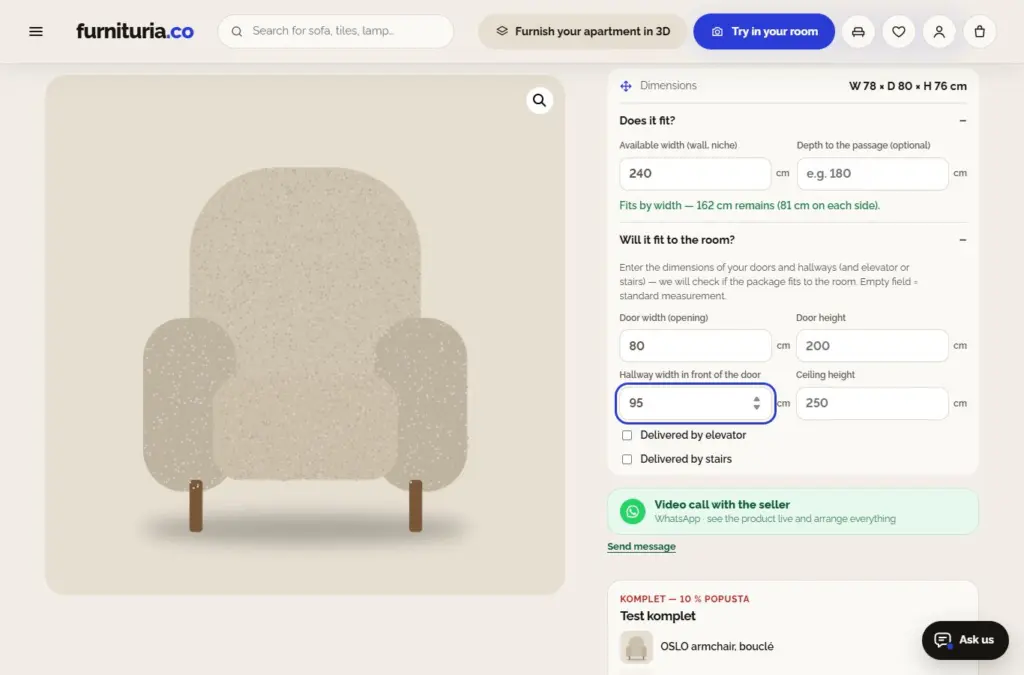
- Does it fit in your home? — enter the free width of the wall or niche (and depth to the passage). You immediately see if the piece fits and how much space is left on the sides.
- Does it pass through to the room? — enter the width of the door and hallway, ceiling height, and if necessary, elevator or staircase. We check packaging dimensions: passage through the door, turning from the hallway into the room, elevator, and landing. An empty field means a standard measurement.
If the package doesn't fit in one piece, ask the seller if the legs or backrest are removable and if it arrives disassembled — before ordering, not after. If the seller offers assembly and carrying services, check them as a service with the product.
5Custom-made furniture and sets
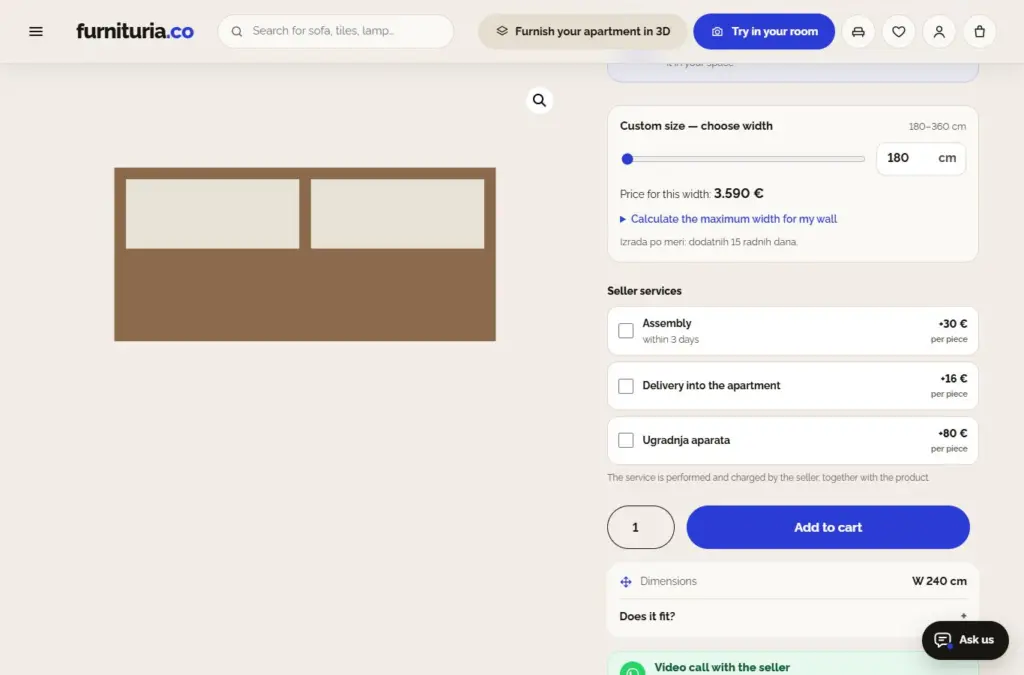
For products labeled "Custom-made — choose width", you select the width with a slider and see the price immediately. You can also enter the length of your wall — you get the maximum width that fits with space on the sides.
- The selected width goes into the cart and order (“custom: 245 cm”), and the room trial draws the piece in exactly that width.
- Additional production time is listed next to the selection.
- A custom-made product cannot be returned within the withdrawal period — the warranty applies just like for everything else.
Sets: some sellers bundle pieces (e.g., sofa, two armchairs, and a coffee table) at a discount. You can see the set on the product page — “Add set to cart” adds everything at once, and “Arrange in room” places them in your floor plan. The discount is calculated automatically when the entire set is in the cart.
6Trial in your room
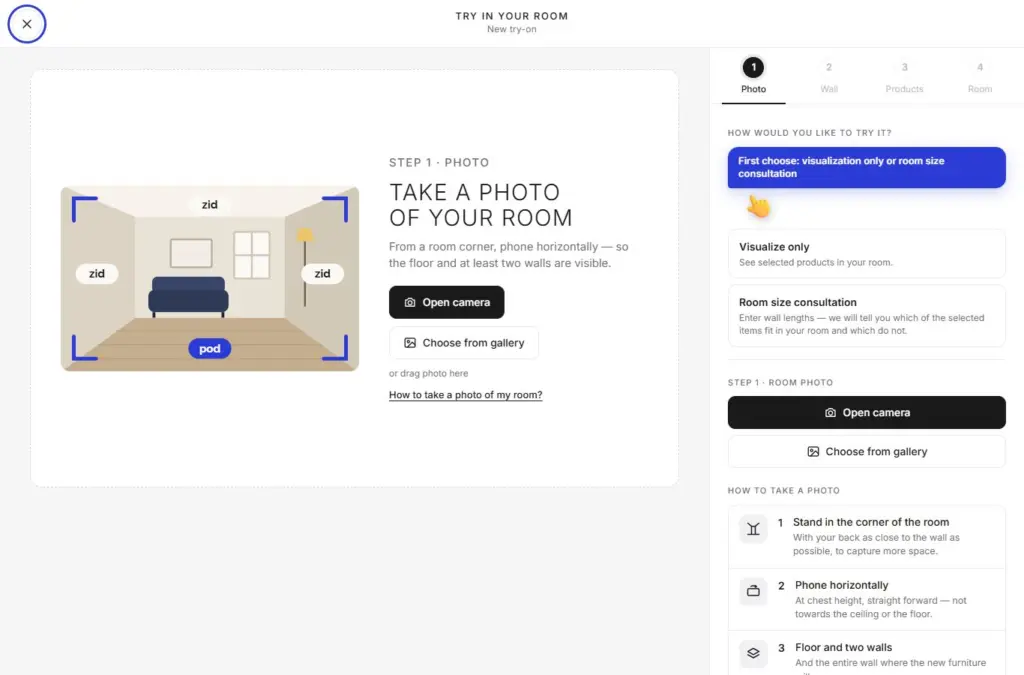
Tap "Add to cart and try in your room" (for colors and sizes, select the color/size first), take a photo of the space (or choose a photo), and in half a minute you will see the chosen piece in your room — to scale, with light and shadows. The product is added to your cart in the process: the trial is for products in the cart (for colors and sizes, first select the variant and add it to the cart). No app required.
- You can also try out colors, fabrics, and dimensions without taking a new photo; select the surface for the floor and walls.
- Free: 1 trial per day for everyone; subsequent ones are enabled by sellers — for logged-in customers with a verified email (the same product up to 3 times per week).
- Save the result in “My trials”, download it, or send it to your household members.
- After the trial, you can enable “Notify me by email if the seller offers a discount” — if the seller sends an offer, you receive a personal code just for that product.
- The "Trial" icon in the header (middle tab Trial on phone) places everything from the cart into one image.
The photo is used only for the trial and is deleted from the server after 24 hours at the latest. Sellers cannot see it. Only you can see your saved trial. More on the How the trial works page.
7Room layout
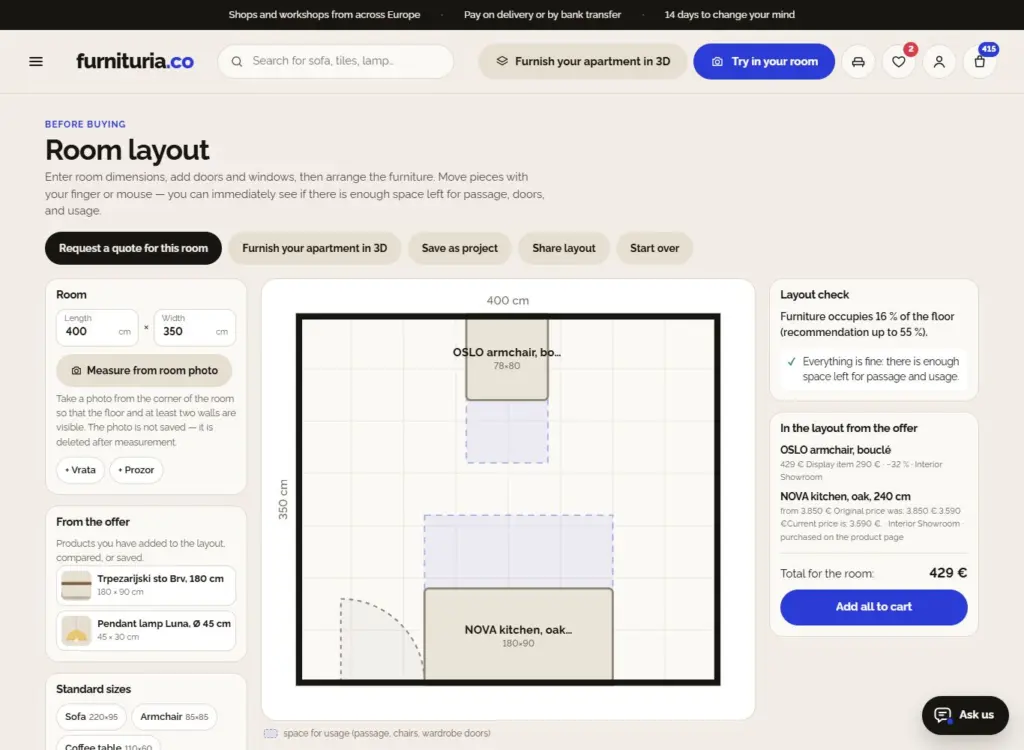
Room layout is a floor plan of your room where you arrange furniture before buying.
- Enter the length and width of the room — or tap “Measure from room photo”: the system estimates the dimensions, doors, and windows, and you verify them. The photo is deleted after measuring.
- Add doors and windows, then furniture: from the offer (the “Arrange in room” button on the product, wishlist, comparison) or standard sizes.
- Drag and rotate pieces with your finger or mouse. The check immediately tells you if there is enough passage, room for chairs, if anything blocks the door, and how much floor space the furniture occupies.
- On the right are the products from the offer with the total price and “Add all to cart” — even when they are from different sellers.
- “Share layout” provides a link that you can send to someone.
Request for quote — custom room or kitchen
For a custom kitchen, built-in wardrobe, or an entire room, you don't have to visit showrooms: send one request for quote, and offers will come to you.
- Choose what you are furnishing, enter room dimensions, budget (optional), when you need it, city, and description. From the Room Planner, the "Request a quote for this room" button transfers dimensions and the floor plan with doors and windows.
- Only showrooms and workshops that make such furniture see the request — without your contact info. Without an account, first confirm your address from the email.
- Offers (price, production time, what is included, validity) arrive via email and on the request page, where you compare them. Once logged in, you can see all requests in My Account → Requests for quote.
- "Accept and pay" puts the offer in the cart as that seller's product — you pay and receive the order just like any other; delivery is calculated according to the seller's price list. Other sellers receive a notification that another offer was chosen.
- The request is valid for 30 days; you can close it earlier.
8"Ask us" assistant
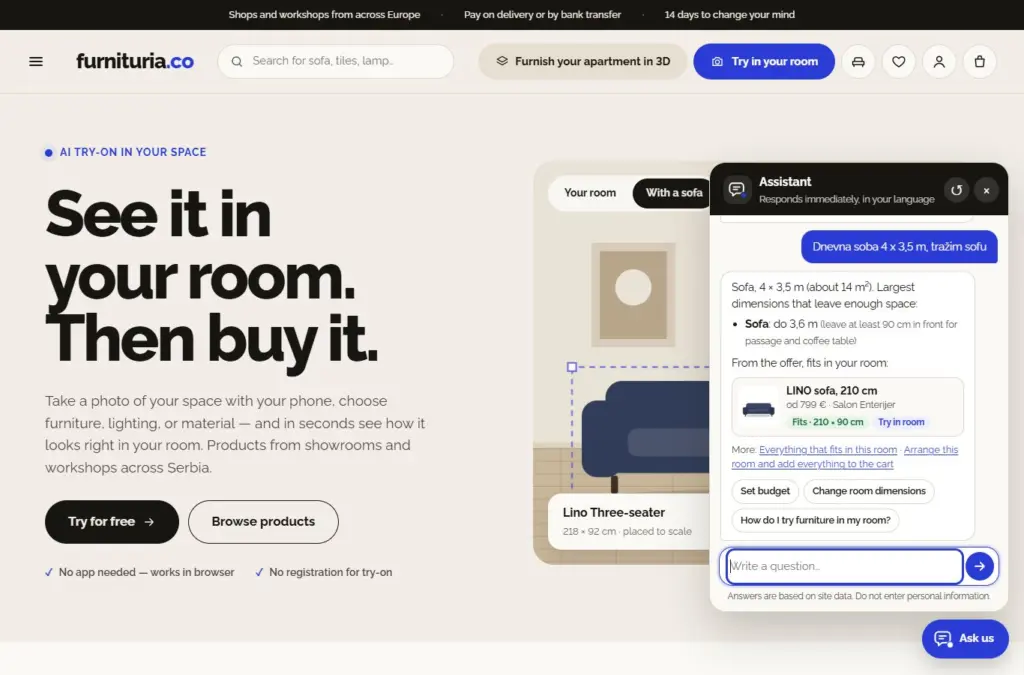
The “Ask us” button at the bottom right (on mobile: the bubble icon in the header, top right) opens the assistant. Ask anything about shopping — delivery, payment, returns, trials, orders — and you get an answer immediately, with a link to the page with more details.
- Room advisor: write which room you are furnishing and how big it is (“living room 4 x 3,5 m, looking for a sofa”). You get the maximum dimensions that fit and products from the offer that match.
- Buttons below the answer lead further: budget, different type of piece, “Arrange this room and add everything to cart”.
- The assistant works in the site's language and does not ask for your personal data.
9Wishlist and comparison
- Wishlist (heart): without an account, it is saved in the browser; with an account, it is saved in your account — they merge upon login. When a product from the list drops in price by 5 % or more, or returns to stock, we notify you by email.
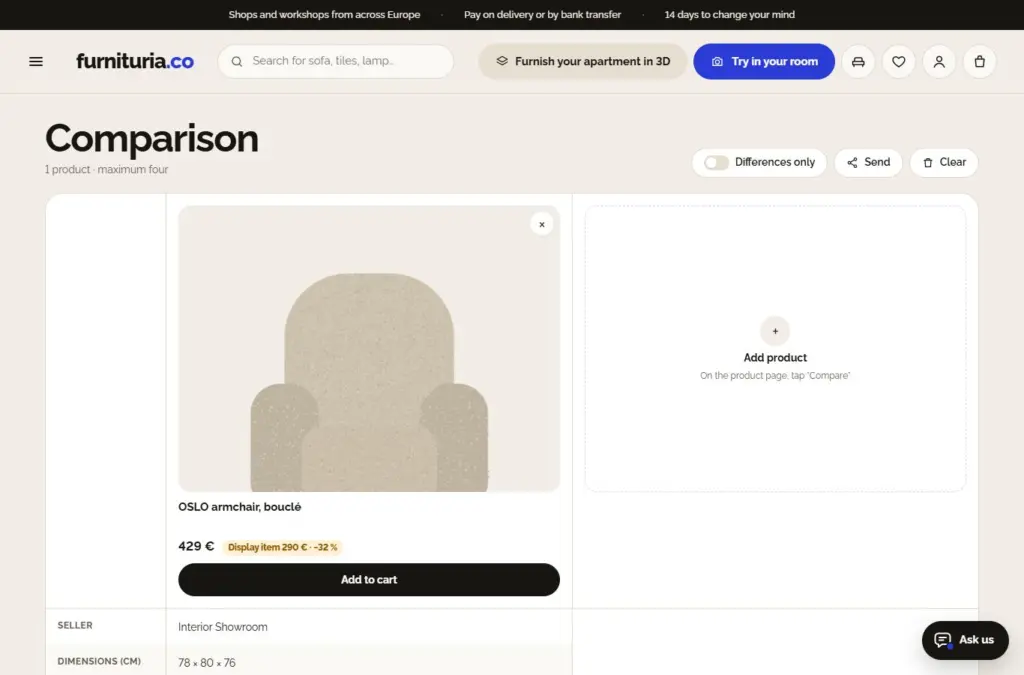
- Compare up to 4 products side by side: price, seller, dimensions, color, material, stock, room trial, rating, and delivery. “Only differences” hides rows that are the same.
- You can send the comparison via a link (“Send”), and add products from the comparison and wishlist to the room layout.
10Cart
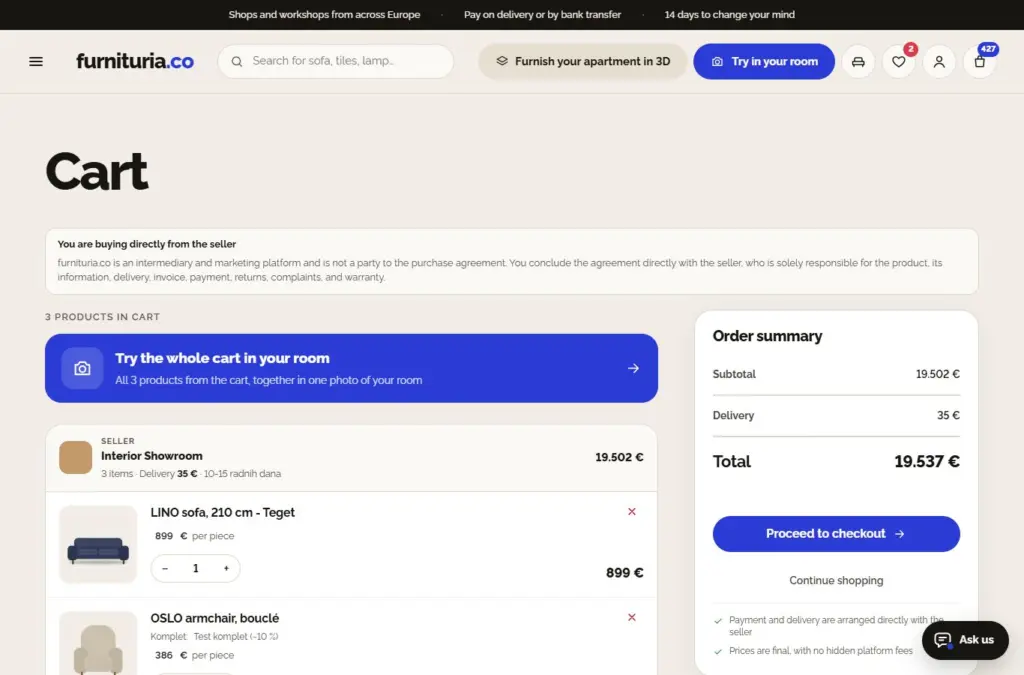
The cart is divided by sellers: for each, you see who is selling, the price, delivery time, and subtotal. Products from different sellers arrive in separate shipments.
- Change the quantity with − and +, and × removes the product — the total refreshes immediately.
- “Have a coupon?” — enter the code (e.g., personal code from an offer after a trial).
- The set discount is visible next to each item in the set.
- Delivery with assembly: for some sellers, along with their delivery, you can choose delivery by our platform partner — two people will bring and bring the furniture inside, at the price and timeframe shown in the cart.
- From another country: you buy from sellers in your country; you only see products from sellers in other countries when they ship to your location — the product page will then state the origin, price, and delivery time.
- On the right is the summary: subtotal, delivery, and total. On mobile, the total and “Proceed to payment” are always at the bottom of the screen.
11Payment
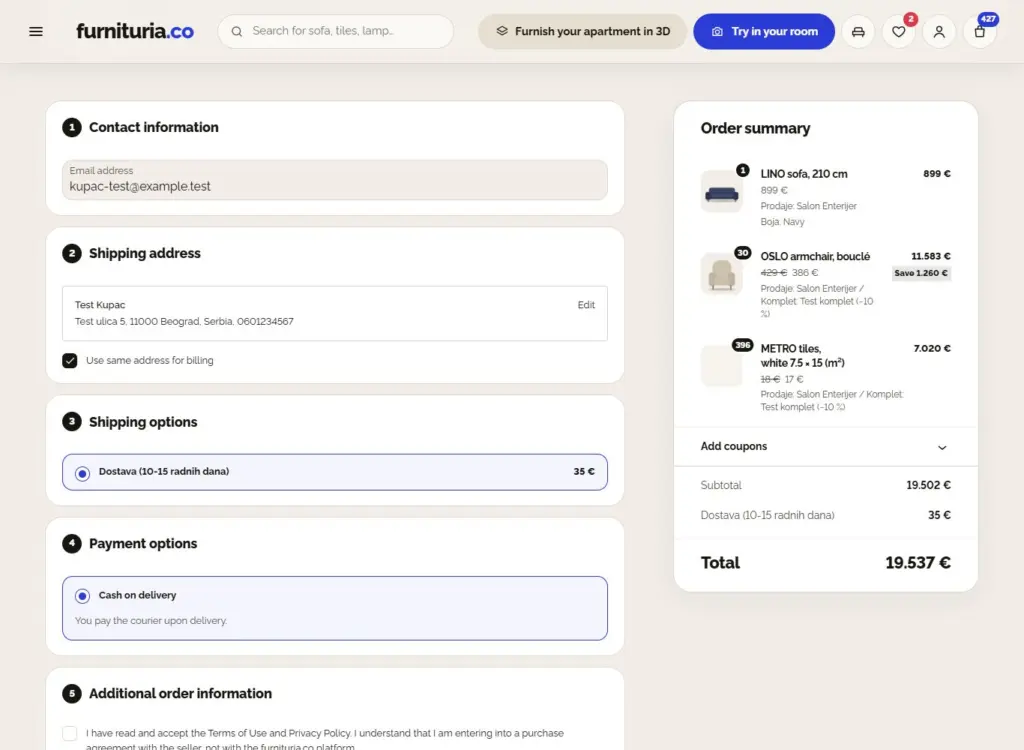
Above the form are the seller's details — full company name, address, tax ID, phone, and email — because you are entering into a contract with them. Then five short steps:
- Contact (email for order confirmation).
- Delivery address (invoice to the same address or a different one).
- Delivery method for each seller.
- Payment method: cash on delivery (pay the courier) or bank transfer to the seller — in Serbia also via IPS QR code from your banking app.
- Acceptance of terms, then the button to confirm the order.
An account is not mandatory: you can order as a guest, everything arrives by email. Money for products goes directly to the seller — the platform does not collect it.
12After the order
- You immediately receive a confirmation by email, and the seller receives a notification.
- The seller accepts the order within 48 hours at the latest — only then do they see your delivery details.
- Once shipped, you receive a tracking number and a "Track shipment" link.
- On the order confirmation page, you will see “What’s next” — four steps, from seller confirmation to receipt.
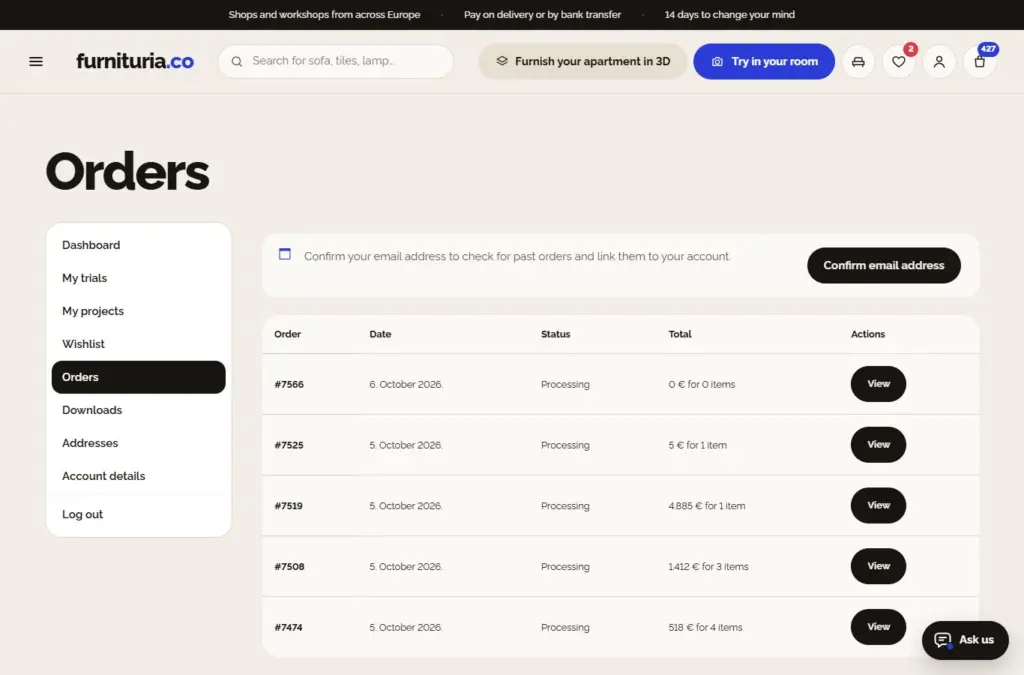
- The status of all orders is at the top of your account and in My Account → Orders: for each seller, the steps are Ordered → Seller confirmed → Shipped → Arrived, with a tracking number. If you have enabled notifications on your phone, the status will arrive there as well.
- When the goods arrive, click “It has arrived” (or “It hasn’t arrived”) in the order — the same button is sent via email. This is how we keep reliable sellers.
- Leave a review: you can add up to 3 photos or an image from your saved trial — "here it is in my room".
For changes or cancellations, contact the seller or us as soon as possible with your order number — it is easiest before the package has been shipped.
13My trials and "Ask the household"
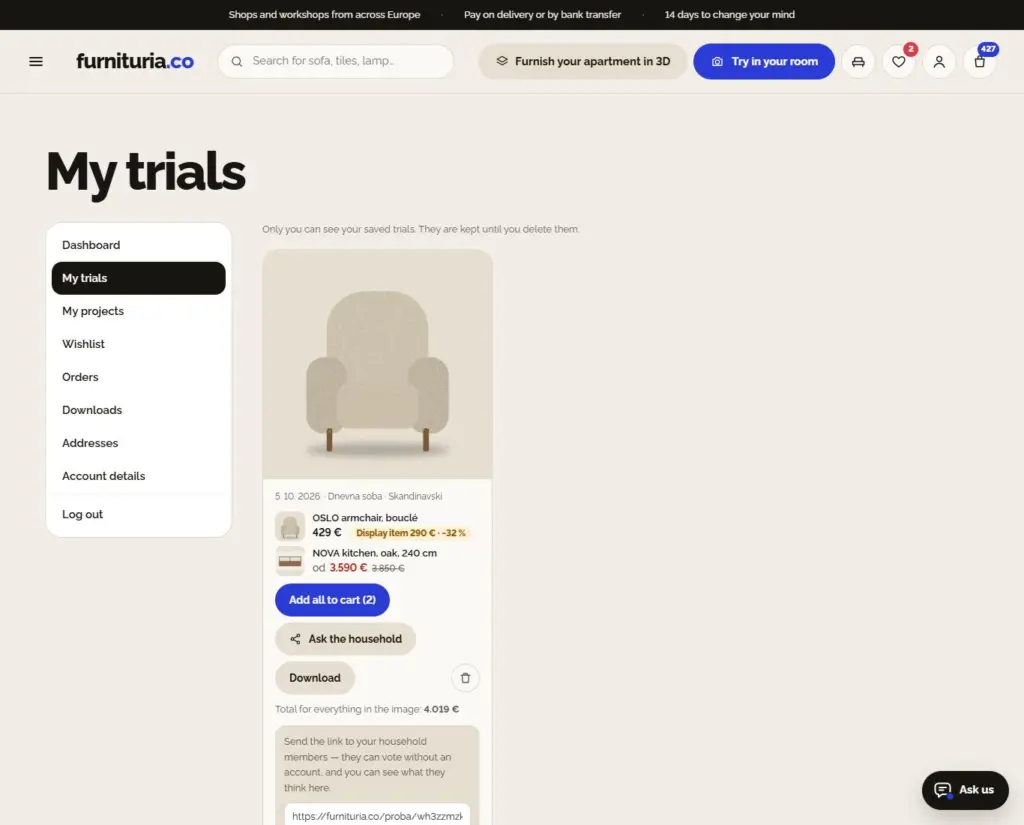
The trial is otherwise deleted after 24 hours; a saved one remains in My Account → My trials until you delete it. Each one includes the products from the image and:
- Add all to cart — all products from the trial at once.
- Download image.
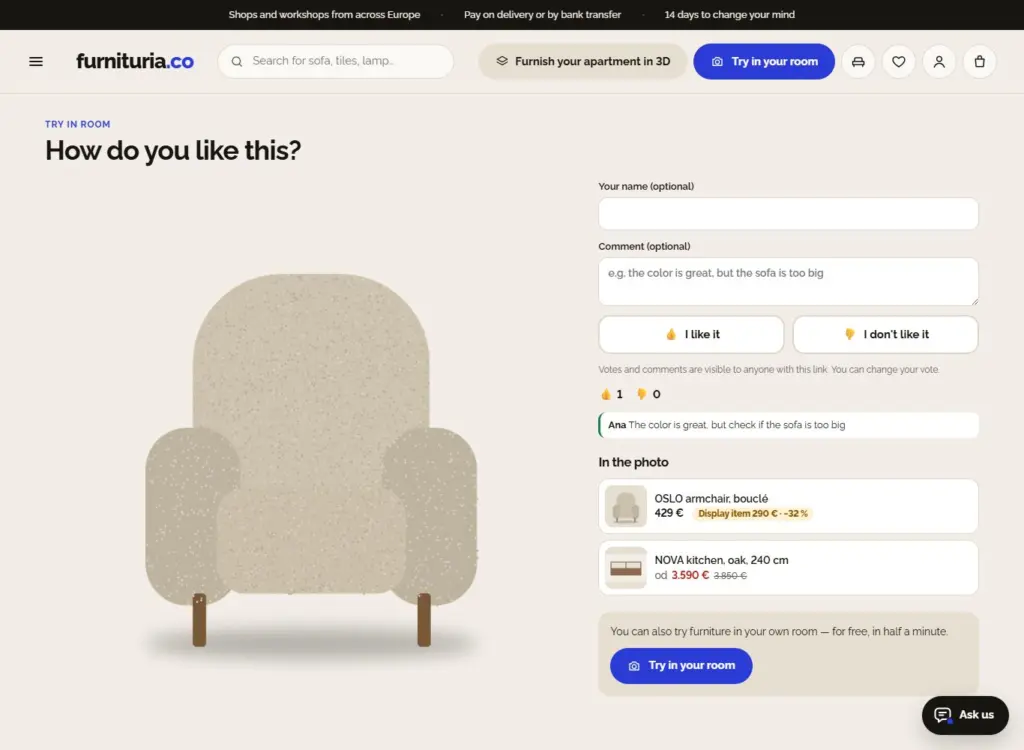
- Ask the household — you get a link to send via WhatsApp or copy. Household members without an account see the image and products, vote "Like" / "Dislike", and leave a comment. You see the votes in My trials, and you can turn off the link whenever you want.
What the household sees
The page from the link shows the trial, products with prices, and voting buttons. Name and comment are optional. No one sees your data, and the page disappears when you turn off the link or delete the trial.
My projects — room with a budget
A project keeps everything you are considering for one room in one place: pieces, budget, room dimensions, and layout.
- On the product page, tap "Add to project" (for variants — selected color) and choose a project or create a new one; from Room Layout, "Save as project" transfers the pieces, dimensions, and floor plan.
- In My Account → My Projects, you can see the budget bar (spent, remaining, or over budget), change quantities, and remove pieces.
- "Add all to cart", "Arrange in room layout", and "Share with household" — a read-only link that you can turn off whenever you want.
- Sellers only see the aggregate number of their products in projects — never your personal data.
3D floor plan — the entire apartment with furniture from the catalog
From a 2D floor plan of your apartment (from an ad, an investor, or a scanned paper plan), you get a 3D view of the entire apartment with the exact pieces you choose. Open it from My Account → 3D floor plan, from a project, or from Room Layout.
- 1. Plan — upload an image of the floor plan (JPG, PNG, or WebP; for PDF, take a screenshot). An account is required: the plan and result are saved only in your account.
- 2. Rooms — the site automatically recognizes rooms and areas from the plan. Check them: change the type (living room, bedroom, kitchen…), remove incorrect ones, and tap into a room on the plan to add one that is missing.
- 3. Furniture — for each room, search for furniture or add it from a project or wishlist, with quantity (e.g., 4 chairs). When the area is known, the site warns you if the furniture takes up too much floor space. A room without furniture remains empty.
- 4. 3D plan — in half a minute to a minute, you get an isometric view: the same walls, doors, and windows as on the plan, with your pieces in their rooms. Below are all products with prices and "Add all to cart"; "Hold for 2D plan" shows the original.
- 1 3D plan per day is free; subsequent ones are enabled by sellers whose pieces are in the plan. You choose furniture for the plan from your cart. A failed attempt does not count. The view is an illustration — check dimensions in Room Layout.
Withdrawal, complaints, and reporting problems
Your purchase agreement is with the seller, and they handle returns, repairs, and replacements. Report the problem on the Safe Purchase page — the report goes directly to the seller, and we track the response deadline.
Withdrawal — 14 days
You can withdraw from a distance purchase within 14 days of receipt without stating a reason — withdrawal form. This does not apply to custom-made products.
Complaint — 2 years
The seller is responsible for ensuring the product is correct and as described for two years from receipt. Report a complaint with the order number and photos.
Report a problem
Damaged, not delivered, wrong product, or unresponsive seller: on the Safe Purchase page, enter your order number and email (or click "Report a problem" below the order in your account or email), describe what is wrong, and add up to 3 photos. The seller has 3 days to respond; if they do not reply, the platform takes over the case. Once resolved, confirm with one click.
Verified sellers and reviews
The "Verified Seller" badge means we have checked the company and showroom — hover over it to see what was checked and when. Reviews marked "Verified Purchase" were left by customers who actually bought the product.
Write to us
Complaints: [email protected]
Everything else: [email protected]
Details: Returns and complaints.
14On your phone, as an app
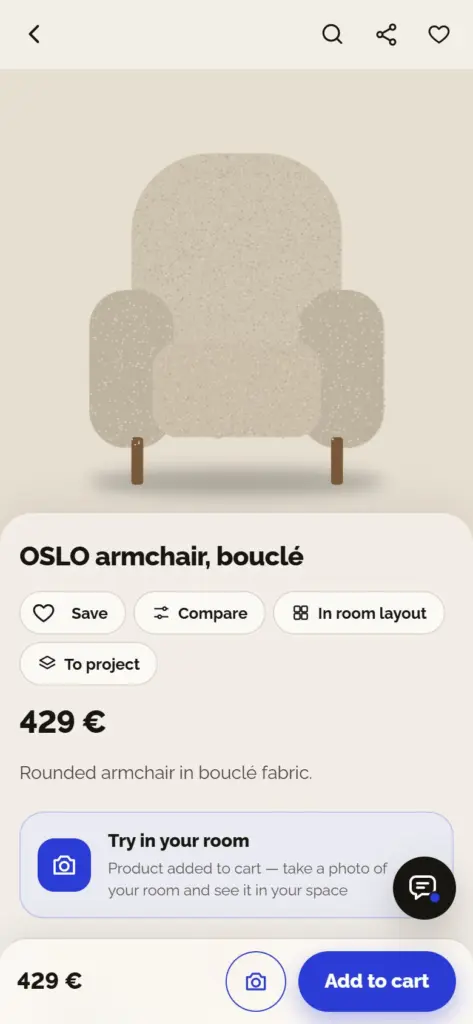
The site on your phone works like an app: at the bottom are tabs for Home, Categories, Trial, Cart, and Account, and on the product page, the price and "Add to cart" are at the bottom of the screen.
- Install on home screen: in your browser, select "Add to home screen" (Android: menu ⋮, iPhone: Share button). It opens without the browser and works even with a weak signal.
- Notifications: in My Account, enable notifications — wishlist discounts and order status arrive on your screen immediately.
- The middle button Trial opens the camera for a room trial.
Frequently Asked Questions
It arrived damaged or didn't arrive — what should I do?
Report the problem on the Safe Purchase page: order number, order email, what is wrong, and optional photos. The report goes directly to the seller, who has 3 days to respond — the response arrives via email and on your report page, where you can reply. If they do not respond within the deadline, the platform takes over the case.
Do I have to open an account to buy?
No. You can order as a guest — confirmation and all order details arrive by email. With an account, you have orders, saved trials, wishlist, and addresses in one place, as well as trials at the seller's expense after the free daily one (with a verified email).
Who am I buying from?
Directly from the seller — the showroom, workshop, or manufacturer whose data is on the product page, in the seller's shop, and at checkout. They deliver the goods, issue the invoice, and are responsible for complaints. The platform is an intermediary and is not a party to the purchase contract.
How much is delivery and when does it arrive?
The price and deadline are set by the seller. You see them on the product page and in the cart, separately for each seller, before you confirm the order. Custom furniture has a longer deadline, stated with the product.
How do I pay?
Cash on delivery (to the courier upon receipt) or by payment to the seller's account, depending on what the seller offers — in Serbia also via IPS QR code. For products with the "Buy from seller" button, you buy on the seller's site, using the payment methods they offer.
Is the room trial free and who sees my photo?
It is free — 1 per day for everyone, and subsequent ones are enabled by sellers for logged-in customers with a verified email. The photo is used only for the trial and is deleted after at most 24 hours; sellers do not see it. Only you can see the trial you save.
How accurate is the trial?
The trial uses the actual dimensions of the product and elements from your photo to estimate scale, but it is an illustration. Before buying, measure the space and use "Does it fit?" and Room Layout.
Can I get a fabric sample before buying?
Yes, for products with the "Order a sample" button: you choose the color or fabric and the sample goes into the cart — for free or for a small price, without delivery costs; the seller sends it by mail to your address. Compare the sample with the trial in your room before ordering the whole piece.
How do I ask a seller something about a product?
On the product page, open “Contact the seller” → “Ask a question on the site” (or “Q&A”) and ask your question. The seller answers, the answer arrives in your email and is published on the product (without your email). For a quick live chat, there is also “Video call with the seller” via WhatsApp.
What is a showroom piece and does it have a warranty?
A showroom piece is the same product that was on display in the showroom, at a lower price; the condition (e.g., "no damage, displayed for 6 months") is written next to the price. Warranty, returns, and the right of withdrawal apply just as they do for a new product. All showroom pieces are on the Outlet page.
How do I track my furnishing budget?
Create a project in My Account → My Projects (e.g., "Living Room", budget 2.000) and add pieces using the "Add to project" button on the product page or from Room Layout. The bar shows how much has been spent and how much remains; you can add everything to the cart with one click, and you can share the project with your household.
Can I see the whole apartment in 3D with the furniture I choose?
Yes — 3D apartment plan. Upload a 2D floor plan, confirm the rooms the site recognizes, and choose furniture from your cart for each one. You get a 3D view of the entire apartment with those pieces, a product list with prices, and an "Add all to cart" button. 1 per day is free; only you can see the plan and 3D view in your account.
Is assembly included?
If the seller offers assembly, carrying, or removal of old furniture, there is a "Seller Services" block on the product page — check what you need and see the price immediately; the service is added to the order. If the block is missing, ask the seller before ordering (video call via WhatsApp).
How do I get a quote for a custom kitchen?
Send a request for quote: what you are furnishing, dimensions, budget, deadline, and description (or send it from the Room Planner). Showrooms and workshops that make such furniture send you offers with price and deadline, without your contact info; you compare them on the request page and accept one — it goes into the cart and you pay for it like any other product.
What if the furniture doesn't fit through the door?
Check before ordering: on the product page, "Does it fit through to the room?" calculates with the packaging dimensions. If it doesn't fit, ask the seller if parts can be removed or if it arrives disassembled. Bringing in and assembly is organized by the seller — it is written in the product description.
How do I contact the seller?
On the product page, open “Contact the seller”: video call and WhatsApp message, showroom visit, and question on the site. For an order, provide its number. If they don’t get back to you, write to us: [email protected].
How do I get a discount?
Follow the "Sale" tag and "On sale" filter, buy the whole set at a discount, add the product to your wishlist (we notify you when the price drops), or after a trial, enable "Notify me if the seller offers a discount" — a personal code arrives by email.
How do I cancel an order?
Contact the seller or us as soon as possible with your order number — it is easiest before the package has been shipped. After receipt, you have 14 days to withdraw from the purchase (except for custom-made products).